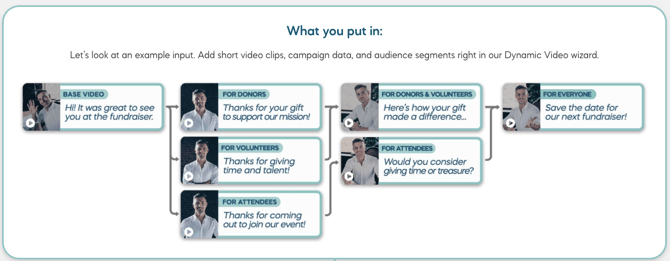
Dynamic Video is one of the core capabilities within Spokenote, the video engagement platform built to deliver personalized, measurable video experiences at scale.
Here’s how it works.
Step 1: Connect Your Audience Data
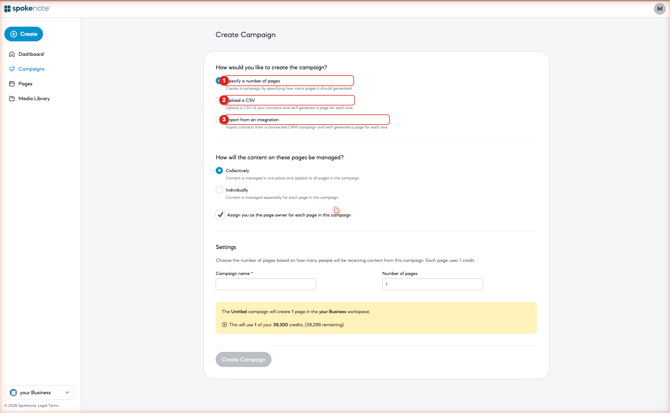
Begin by uploading your contact list from your CRM or internal system. Include any relevant segmentation data like roles, industries, or event attendance. Spokenote reads your audience structure and prepares the framework for mapping modular clips to the appropriate segments.
Step 2: Record or Upload Your Video Clips
Next, create short, reusable video segments. Common components include:
-
A general introduction
-
Segment-specific messaging
-
Industry or persona-based variations
- A clear call to action
Each clip becomes a modular building block. Instead of editing multiple versions manually, you record intentional components that can be assembled automatically.
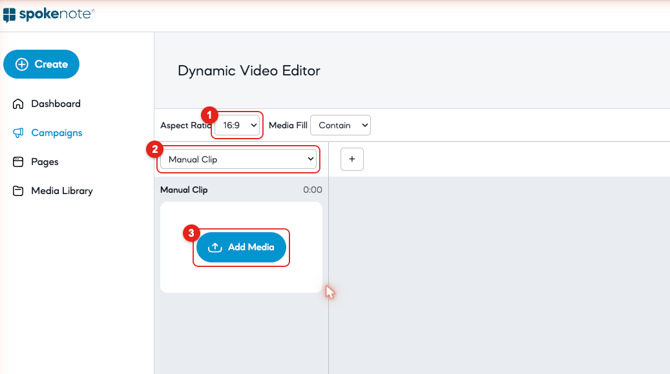
Spokenote supports both in-platform recording and uploaded video files.
Step 3: Assemble and Deploy
Once your clips are mapped to audience segments, Spokenote assembles the correct version of the video for each recipient in the cloud. The platform then generates unique URLs for delivery.
These links can be exported and distributed through your existing communication channels, including email, SMS, landing pages, or QR activation in print.
The Result:
With modular components and automated assembly, you can create personalized video experiences for dozens, hundreds, or thousands of recipients without manual editing or repetitive re-recording.
Spokenote combines structure, scale, and measurable engagement inside a single platform.